

Node.js 25 Version Release: A Quick Overview

January 20, 2026 | Web Development

The current release of Node.js 25 is here with improved features. The latest version 25.2.1 has been released to reveal what’s new for the backend developers to expect.

Since its inception on May 27, 2009, to the current date, Node.js has become extremely popular among server side engineers. In this long period of time, today, this non-blocking I/O platform has established itself as a major tech stack for infrastructure-backed application development.

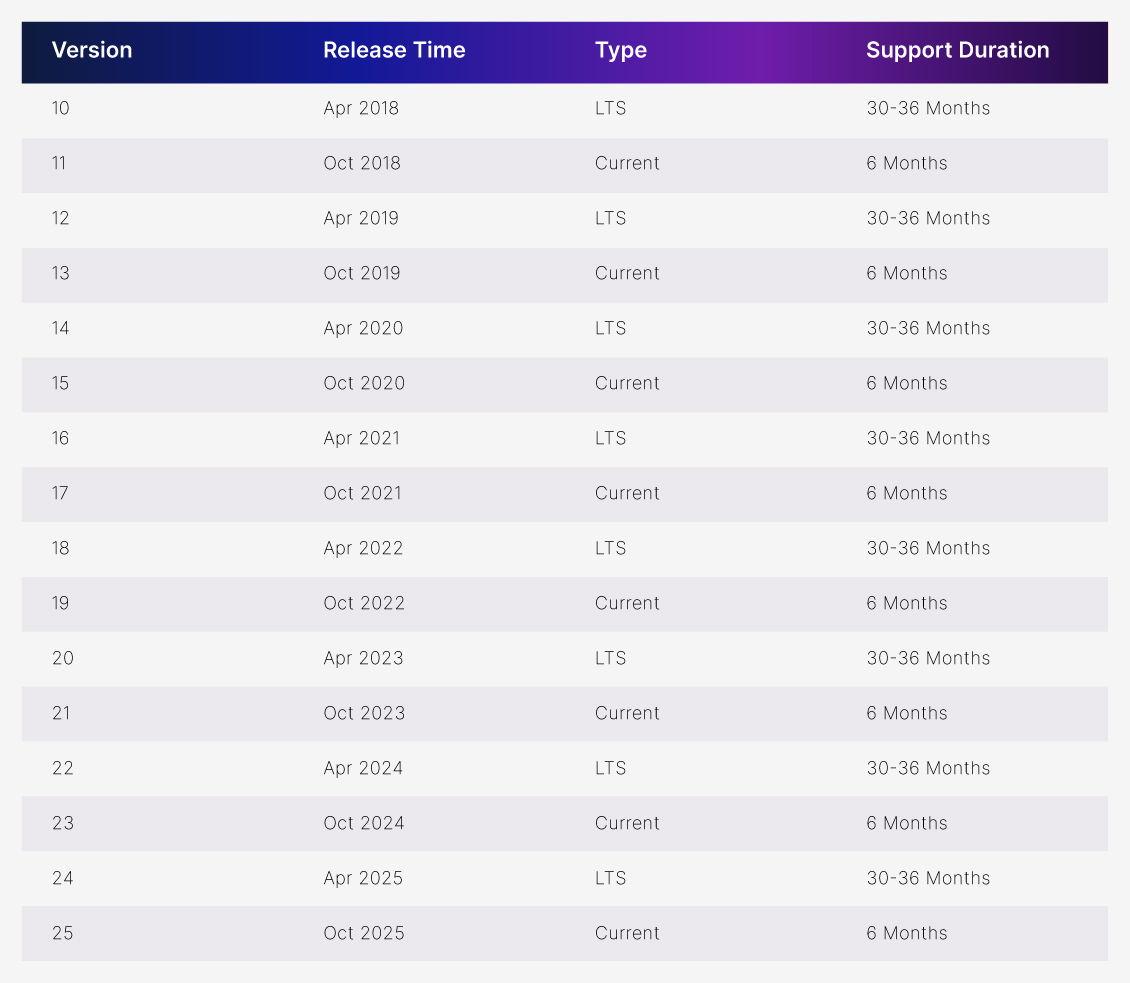
This is an odd-numbered release, which means it isn’t going to receive long-term support. However, it can be used to uncover upcoming features and updates. As we have witnessed with all version releases, even-numbered versions get an LTS release and 30-36 months duration and Odd-numbered versions get a current release and 6 Months duration. After spending 6 months in current, odd numbers are no longer supported and even numbers get LTS support.

(Note: This Node.js 25 is a current version release and not recommended for production.)

Node.js versions

Let’s break down what this current release has to offer and what to expect from the next LTS version.

What is Node.js 25?

The latest Node.js 25 release is the current release to introduce and test new features to unleash performance. This JS runtime environment comes under the most commonly used web technologies according to the Stack Overflow developer survey. It is compatible on OS such as z/OS, Linux, macOS, Microsoft Windows, SmartOS and others.

This server-side JavaScript environment is generally used for command-line tools and server-side scripting. It is written in JavaScript, C++, Python, and C. After the release of 22.6.0, Node.js natively supports JavaScript and TypeScript. The release of Node.js 25 has unveiled new possibilities for the future of development.

Node.js 24 Vs Node.js 25

The latest version of the node environment has introduced critical enhancements to turbocharge the development. Outdated versions, security vulnerabilities, latency issues, and storage challenges are addressed in the latest release.

FeaturesNode.js Old VersionNode.js latest Version
VersionNode.js 24Node.js 25.2.1
V8 EngineVersion 13.6Version 14.1
npm versionnpm 11npm 11+
PermissionStable file system accessExperimental network access control
Code NameKryptonCurrent
StabilityRecommended for productionActive development/ Not Recommended for production

New features of Node.js 25 version

If you are thinking about what’s new in Node.js 25? It might be just another update to boost performance. Well, you are right, but not completely. Because this version introduced modern security, speed and improved features. Let’s take a look at

1. V8 Engine 14.1 Upgrade

The new release allows heavy payload transmission with this upgrade and boosts performance. This allows data serialization and deeper integration with web apps. With this, JSON.stringify performs 40% faster. It’s like an old car engine is replaced with a new one to improve the performance. (Here, think of Node.js as a car and the 14.1 upgrade as a new car engine)

2. Built-in tools Base64 and Hex

Built-in tools of Base64 and Hex convert binary data 0 and 1s for secure data transmission and compression. The common encoding tasks can be managed through Uint8Array methods. It coordinates raw computer stuff such as files, images, and raw network data.

3. Portable compile cache

Serverless and container environments can now boost 15-20% advancement in compile cache portable options. This allows reading, parsing, compiling and running the JavaScript code to reuse it across multiple machines that are compatible with Node and V8 versions.

4. GlobalErrorEvent

The browser API GlobalErrorEvent class can act as a last line of safety net to prevent app crashes. This allows robust error handling throughout server-side and browser environments.

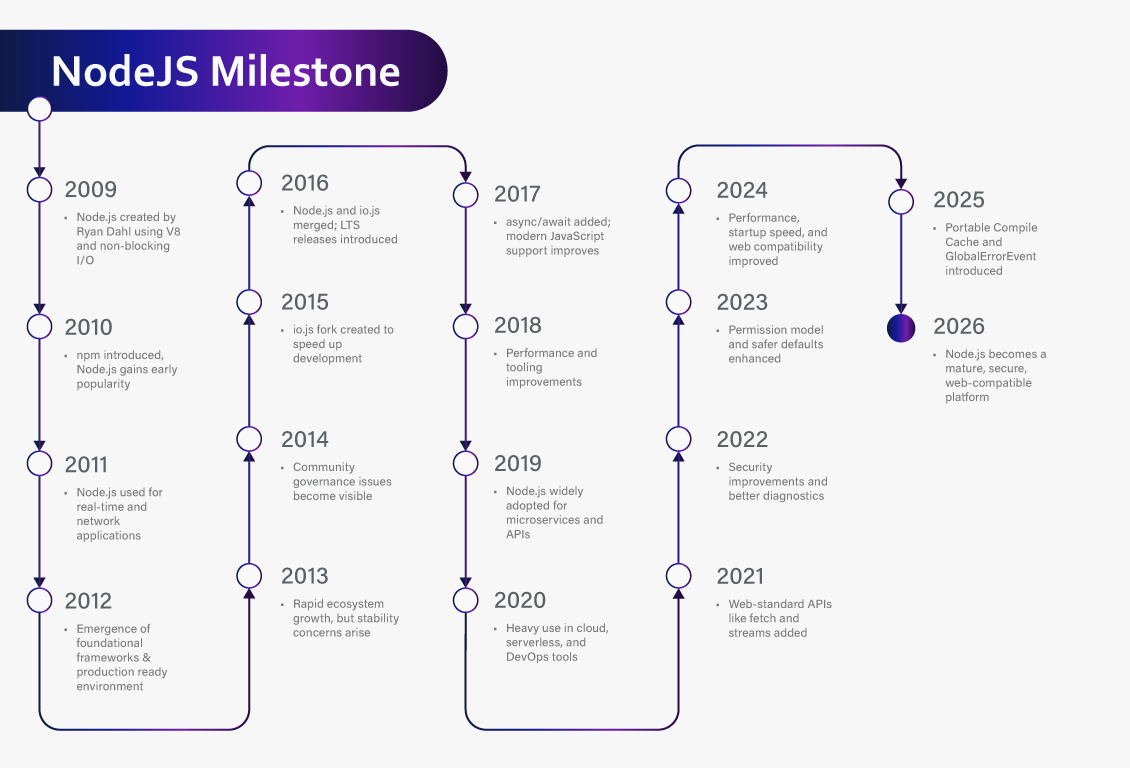
The Journey of Node.js

The Journey of Node.js

Node.js 25 Improvements

This time around the node environment comes with the promise of security enhancements, performance upgrades, web standard cohesion and more.

Faster Encoding and Decoding

Converting data into a suitable format requires quality encoding and decoding methods across software applications. The core operations in the development mandate compressing videos and images for storage capacity, text encryption and decryption for security purposes. Now, circling back to the 2nd feature we have discussed in the blog, built-in tools like Base64 and Hex enable effective data processing and transmission.

Prevention of accidental insecure behaviour

According to Secure Code Warrior, 86% of developers often overlook application security when writing code. This is why protecting servers and databases is utmost important for organizations. The inbuilt security sandbox permission model blocks unauthorized behaviour like reading secrets, random file access, or executing network calls.

Secure Server Environment

Built-in permission model in this JavaScript runtime environment enables enhanced security by assigning permissions to authorized tasks to eliminate unauthorized activities. This includes approval for network, file systems access, TLS/SSL connections and other sensitive features to minimize the attacks. Any suspicious activities without approval will generate alerts or error messages.

Data Intensive Microservices

Ecommerce, food delivery apps, and video streaming services are the best examples of data-intensive micro services. Node.js’s non-blocking I/O architecture helps in managing heavy loaded data with asynchronous operations. This JavaScript runtime manages connections simultaneously, boosting the performance of real-time tasks.

FAQs:

1. How to install Node.js 25?

Ans: To install version 25 of Node.js follow the steps mentioned here. Step-1 Download .msi installer from nodejs.org Step-2 Run the installer to locate your download Step-3 Finish setup with npm Step-4 Verify the installation by using the node -v command in the command prompt.

2. What is Multer in Node.js?

Ans: Multer is a tool for Node.js that translates the form of a file’s data uploaded by a user. This data comes in multipart/form-data, and Node does not address this format here, where Multer saves the day by parsing the data to make uploaded files easy to use.

3. Is Node.js Synchronous or Asynchronous?

Ans: The simple answer to this is that Node.js is asynchronous, but does synchronous things internally. It is specifically designed for asynchronous purposes, but when needed, it does synchronous functions as well.

4. What is Libuv in Node.js?

Ans: Libuv is the soul of Node.js as it enables speed and performance of its operations. It is a cross platform abstraction library that enables non-blocking event-driven architecture. It manages network I/O operations via thread pool.

5. Is Node.js single-threaded or multi-threaded?

Ans: Node.js uses both single thread and multi thread methods to accelerate operations.

6. How to Uninstall Node.js in Windows?

Ans: To Uninstall Node.js in Windows, Step-1 Go to the Control Panel Step-2 Tap on “Programs and Features” Step-3 Select Node.js from the list Step-4 Uninstall the program.

Related Articles

March 22, 2021 | Web Development
Angular vs React 2021: Which JS Framework To Select For Your Project?

Angular and React are widely used JavaScript frameworks. Here’s the ultimate comparison to help you choose the right one for your project.

Read The Post
November 10, 2025 | Web Development
Next JS vs Node JS: Choose The Right Framework for Your Project

Are you struggling to pick the right framework for your project? Both Node.js and Next.js are ideal frameworks utilized by…

Read The Post
May 24, 2021 | Web Development
Which Types of Apps Can You Build in Python?

Here are the top 7 types of apps you can build with Python — from games and blockchain applications to enterprise-grade solutions. With Python, almost anything is possible.

Read The Post